
Rating Presets on Comments
Inspector Toolbelt allows you to preset ratings on individual comments in your template so that common findings are automatically rated and broken out as sub-items during an inspection. This feature is designed to save time, reduce repetitive clicks, and speed up report writing, especially for frequently used defect comments.
This functionality builds directly on how sub-items work in Inspector Toolbelt. If you’re not familiar with sub-items, we recommend reviewing this article first:
https://inspectortoolbelt.com/knowledge-base/sub-items/
How Rating Presets on Comments Work
Rating presets are configured inside your inspection template, not during the inspection itself. Once set, they automatically apply when the template is used—provided the same rating system remains in place.
In short:
-
You preset a rating on a comment in your template
-
That comment becomes a rated sub-item by default
-
Selecting the comment during an inspection automatically applies the rating
Step-by-Step: Setting Up Rating Presets in a Template
1. Confirm a Rating System Is Attached to the Template
Before rating presets can work, your template must have a rating system associated with it.
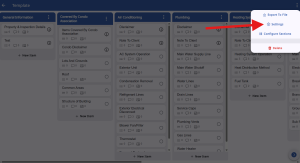
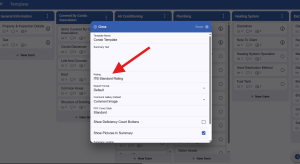
If no rating system is attached, comments cannot store rating presets.
2. Select a Comment in the Template
Open your inspection template and locate the comment you want to automate (for example, “AC unit was defective”).
3. Assign a Rating to the Comment as a Sub-Item
Give the comment a rating. When a comment is rated in the template, it will be treated as a sub-item.
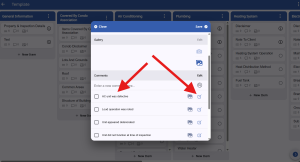
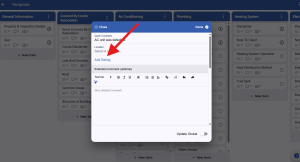
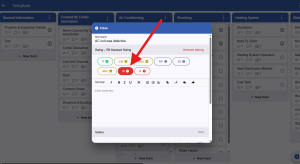
This rating becomes the preset for that comment.
What Happens During an Inspection
When you use that template in an inspection:
-
Selecting the comment automatically:
-
Applies the preset rating
-
Breaks the comment out as its own sub-item
-
-
No additional clicks are required
-
The report remains clean, consistent, and properly structured
This is especially useful for common defects that you don’t want to manually rate every time.
Important Notes and Limitations
Changing the Rating System for an Inspection
If you choose a different rating system when starting an inspection:
-
All preset ratings tied to the original rating system are ignored
-
Comments will revert to standard, unrated comments
-
No sub-item ratings will be applied automatically
Changing the Rating System on the Template
If you change the rating system attached to the template itself:
-
Existing rating presets will no longer apply
-
Comments will revert back to standard comments without preset ratings
Rating presets are rating-system specific and must match the rating system used during the inspection.
Why Use Rating Presets?
-
Faster report writing
-
Fewer repetitive actions in the field
-
Consistent defect classification
-
Cleaner reports with less manual cleanup
-
Ideal for high-frequency findings
Summary
Rating presets on comments allow you to front-load your work in the template so inspections move faster and reports stay consistent. As long as the rating system remains the same, Inspector Toolbelt will automatically apply ratings and sub-items exactly as you’ve defined them.
If you have questions about templates, rating systems, or sub-items, contact support or review the related knowledge base articles.